Send gifts to multiple addresses
Send the same set of gifts to several addresses, or create separate carts for different gifts. Review all deliveries and pay once through Shopify.
How to use it
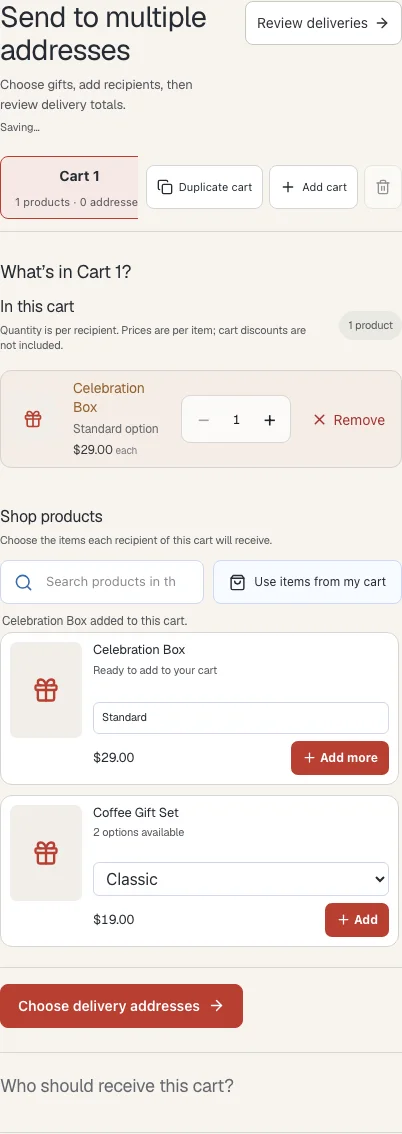
- Open multi-address gifting from the store’s gift options. The first cart is labelled Cart 1 automatically.
- Choose products and variants, then set the quantity each recipient should receive.
- Choose Choose delivery addresses. Use Add recipient or Import CSV to add the people who should receive this cart.
- Continue to the shared-note step if offered. Add a note or choose No shared message.
- Use Add cart for a different set of gifts, or Duplicate cart to copy products and the note. Add the recipients for that cart separately.
- Choose Review deliveries. Enter your buyer email, resolve any address or stock errors, select shipping and review the total before continuing to Shopify checkout.
Where to find it
What to know
Each recipient in a cart receives all of its listed products and quantities. For example, a cart with two mugs sent to three recipients needs six mugs in total.
The store decides whether multi-address gifting is available. Stock is checked during the order process but is not reserved; ask the store about an unavailable product or delivery destination.
What happens next
After payment, the store prepares each recipient’s delivery. Your tracking email gives you a link to view them together.
Was this helpful?
Still need a hand? Contact support below.